Export, Recents & sync
When the board is ready, Export lives in the toolbar (⌘⇧E on the Mac). Pick a format and where it goes; the export is always fit to the content, never to a page size. Export is part of Pro.
| Format | Best for |
|---|---|
| A vector PDF of the board. Name and author go into the file's info, a password locks it, Margin sets the space around the content, Optimize File Size shrinks it. | |
| MockApp | The board itself, as an editable package that keeps its preview, or a single-file archive for sending around. |
| Pixara | Opens the board in Pixara, our sister app, for slides, transitions and video — one page per screen. |
| Specs | A folder with SPECS.md, board.png and a ready-made prompt — point Claude Code, Codex or any coding agent at it and it builds what you designed. In detail below. |
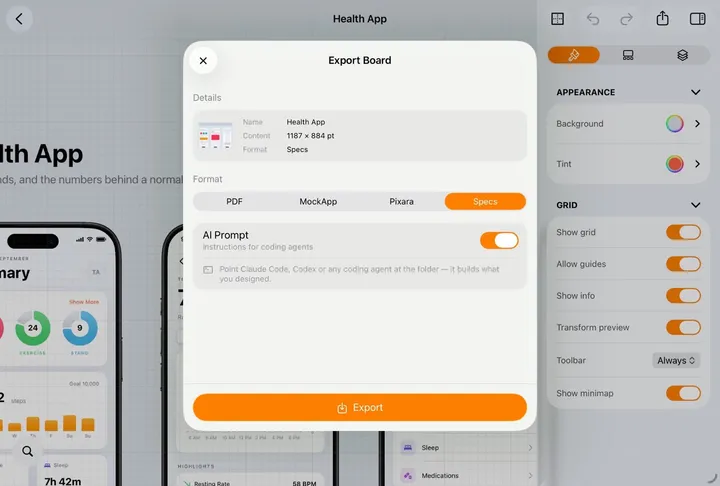
Specs, for a coding agent
The other four formats hand the board to a person. Specs hands it to an AI coding agent: instead of one file, it writes a folder named after the board, with the design described in text next to the pictures it refers to.
Foodie/
- README.md the brief your agent reads first
- SPECS.md every element, size, font and colour
- board.png a picture of the whole board
- assets/ the images you placed
- README.md is the prompt you did not have to write. It is addressed to the agent, not to you: what the folder is, what to read, what to build.
- SPECS.md is the design in words — every element with its size, its font and its colour — so nothing has to be guessed off a screenshot.
- board.png is the same board as one image, for the agent to look at while it reads.
- assets/ holds the images you actually placed, as files, so what gets built uses your photography and not a grey placeholder.
- No framework to pick. Nothing in the folder assumes React, SwiftUI or anything else — the agent builds in whatever your project already uses.
- One screen is a valid handoff. Select a screen, Export from its own menu, and the folder describes just that screen.
Copy and paste, in and out
Export is for the finished board. For everything smaller there is the clipboard: MockApp uses the system one, so it already talks to the apps you have open next to it — no file, no upload, no round trip.
- Out. Copy a selection (⌘C) and paste it into Pages, Keynote, Mail, Notes or a chat. What lands there matches what you copied: a text pastes as real text, a photo as the picture itself, and anything built out of parts — a whole iPhone screen, a flow, the board — is flattened on the way out and arrives as an image.
- In. Copy an image or a block of text anywhere — Safari, Photos, a spreadsheet, another design tool — and paste it onto the board: pictures land as photos, text as a text element.
- Between boards. Copy on one board and paste on another and the elements stay real elements: selectable, editable, styles intact.
- Or drag. On the Mac and on the iPad, dragging works wherever pasting does — a selection out to another window, a photo, an SVG or a PDF in from Files.
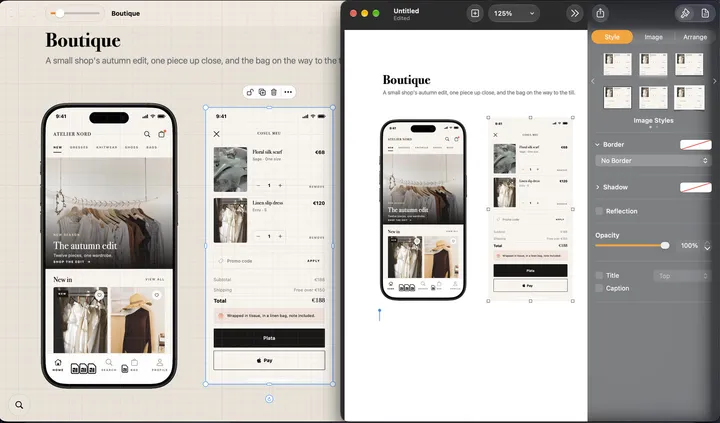
Recents
- Recents is every board you work on, wherever its file lives, the last edited first; Sort By, in the ⋯ menu, changes the order.
- Recently Deleted, in the same menu, keeps boards deleted from the MockApp folder for thirty days; restore them or delete them for good. A board deleted from any other folder goes to the Trash.
- Long-press or right-click a board: Open, Duplicate, Rename, Export, Delete — on the Mac also Move To… and Show in Finder, and Remove from Recents for a board outside the MockApp folder, which leaves the file alone. Select, in the ⋯ menu, picks several at once.
- Search finds boards by name. Settings › Board details chooses what shows under each preview.
- Spotlight and Siri. Boards are indexed, so a search from the Home Screen or the Mac finds them by name; "New MockApp board" and "Open MockApp board" work as Siri phrases and in the Shortcuts app.
- A .mockapp file opens in MockApp from anywhere. From the Finder or Files it opens where it is, and your edits save into that file; from Mail, AirDrop or a chat it comes in as a copy. Either way it is in Recents.
Where boards live
- On the Mac, a new board asks where to save it, like Pages: a client folder, the Desktop, or iCloud Drive › MockApp. The panel opens in the folder you used last. Move To…, in the board's menu in Recents, moves it later.
- On iPhone and iPad, new boards go to iCloud Drive › MockApp. To keep one somewhere else, export it as a MockApp file or drag it out; a board you open from Files still opens where it is.
Sync
- Boards in iCloud Drive › MockApp — the folder shows up in Files and the Finder too — sync in the background. Open the same board on another device and it is already there.
- A board in another folder syncs the way that folder does: one in iCloud Drive syncs, one on the Mac's own disk stays on the Mac.
- Saved components sync the same way, so a part saved on the iPad is in the palette on the Mac.
- Offline works. Everything except the AI runs on the device; changes sync when you are back.