AI & sketch
There is no chat in MockApp. AI lives inside one element — the Magic AI container — and in a handful of actions on images and text. It fills a box you drew with real, editable parts, and then gets out of the way.
The Magic AI container
- Drop a Magic AI container from the quick row of the Elements panel and size it like the screen or card you want.
- Describe what goes inside — "a settings screen with a profile header and three toggles" — or sketch it with the Pencil. Tap a selected container on its right half for the prompt, on its left half to sketch.
- Tap Generate. A few seconds later the container holds regular MockApp elements: text, shapes, cells, icons. Edit them like anything else.
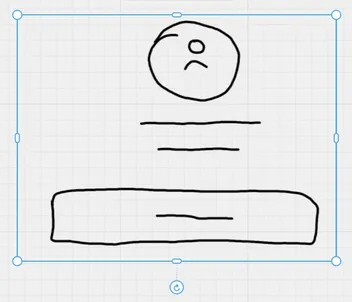
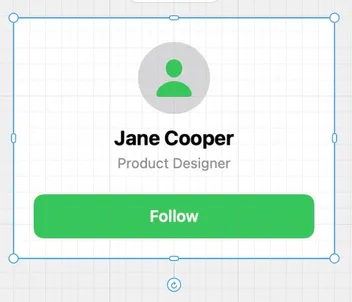
Ask again and the container is edited, not replaced: "make the header taller", "duplicate the row five times", "swap the photo for a map" all work on what is already there.
Sketch to mockup
On iPad, draw inside the container instead of typing: boxes for cards, lines for text, a circle for an avatar. The sketch and the prompt can be combined — draw the structure, describe the content.
AI on images and text
| Action | What it does |
|---|---|
| Remove Background | Cuts the subject out of a photo, on-device, in a second. |
| Convert to Vector | Turns a raster logo or icon into an editable path. |
| Extract Text | Reads the text in an image into a text element. |
| Generate with AI | Makes a photo from a prompt, in Media; each one costs a credit. |
| Correct · Rephrase · Elaborate · Summarize | Rewrites the selected text without leaving the board — with Apple's on-device model where it is available. |
Limits, honestly
Generation is a Pro feature and there is a daily token allowance for everyone, so a long session will not run up a bill. The model sees your prompt, the container's size and tint, and a picture of what is inside it — nothing else on the board.