Figma alternative for iPad, iPhone and MacFigma at your desk.MockApp in your hands.

Figma is built for teams in the browser. MockApp is a native app
for iPad, iPhone and Mac. Here is how they compare, honestly.

MockApp

Native on iPad, iPhone and Mac.

  • Design on iPad and iPhone, not just view
  • Apple Pencil, touch, trackpad and mouse
  • Over a hundred templates to start from
  • No account; your files stay in iCloud Drive
  • Works offline
  • Claude Code, Codex and Cursor via MCP · soon
Download free

Figma

In the browser, on any computer.

  • Teams editing one file at the same time
  • Mac, Windows and the browser
  • Plugins and large design systems
  • Dev Mode for developers
  • An MCP server for AI apps
  • Free Starter plan, paid seats per editor

Many designers use both. See how below.

Side by side

Feature by feature.

Checked against Figma's own help and pricing pages, November 2026.

FeatureMockAppFigma
Edit designs on iPad and iPhoneYes, the full editorView and comment only
MacNative appDesktop app
Windows and the browserNoYes
AccountNot neededRequired
OfflineWorks offlineLimited: files already open
Where your files liveiCloud Drive or FilesFigma's cloud
TemplatesOver a hundred, built inUI kits and community files
Live co-editingNot yetYes
Clickable prototypesComing soonYes
AIMagic AI: sketch or prompt to screenFigma AI, with monthly credits
AI apps through MCPComing soon: a local server on your MacRemote server; writing in beta, paid plans
ExportPDF, MockApp file, SpecsPNG, JPG, SVG, PDF
PriceFree plan; Pro, also for lifeFree Starter; paid seats per editor
AI apps · MCP

Your AI app, on your board.

Both connect to Claude Code, Codex, Cursor and other AI apps through MCP. They do it differently.

Coming soon

MockApp: on your Mac

A local server inside MockApp. Your AI app builds screens from real MockApp parts while you watch its cursor on the board. Pause or undo any time.

Figma: in the cloud

A remote server. It gives AI apps design context for code, and can write to the canvas through the Plugin API: in beta, on paid plans.

Already in Figma?

Bring your frames along.

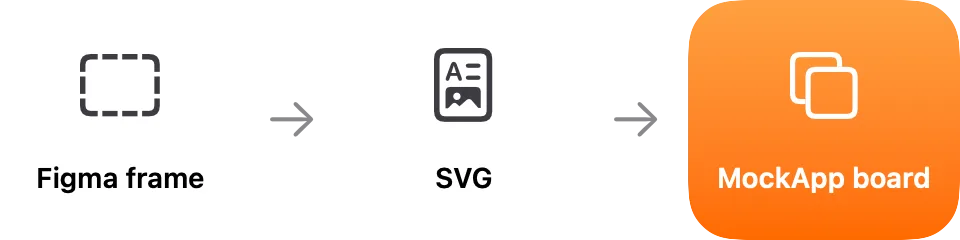
Export a frame from Figma as SVG and open it in MockApp: paths, fills and text stay editable. A PDF comes in as one image per page.

Templates & import in Help →
A Figma frame exported as SVG and opened as a MockApp board
Questions

MockApp vs Figma, answered.

Is MockApp a Figma alternative for iPad?

Yes, for solo designers and small teams. MockApp edits on iPad and iPhone; Figma's app there only views and comments.

Can I open Figma files in MockApp?

Not .fig files. Export frames from Figma as SVG to keep paths, fills and text editable, or as PDF.

Does MockApp work offline?

Yes. Boards are files on your device and in iCloud Drive. Only the AI features need a connection.

Can my team edit together?

Not live yet: share the .mockapp file or a PDF. For real-time co-editing today, Figma is the better pick.

Does it work with Claude Code or Cursor?

Soon, through MCP on your Mac: connecting is free, designing with your AI app is part of Pro.

Is MockApp free?

Free to start: everything for 15 minutes a day. Pro is monthly, yearly or once for life.